Now coming back to our original topic, of course, there is no doubt that hardware wallets are the best way to store your cryptocurrencies securely and also be able to use it.
I have earlier published many guides to help a newbie understand about Ledger wallet and if you haven't read them, it's a good time to read all of them one by one. Open these links in a new tab and read them once you are done reading this tutorial, I am pretty confident that you will find something fruitful in them.
You can also watch this playlist on YouTube to learn how Ledger wallet works. Now if you are satisfied you can order your ledger wallet from the official site here.
For this NEO's wallet on Ledger Nano S tutorial, I assume you already have a ledger wallet and knows how to use it. With this understanding, let's move ahead and learn something new today.
How to use NEO wallet on Ledger Hardware wallet:
Ledger offers various cryptocurrencies wallets and they call them applications. You can install 5 applications (different cryptocurrency wallets) at a given time and to use NEO wallet your Ledger should be updated to 1.3.1 firmware at least.
NEO Wallet on Ledger works with the NEON wallet which is an open source cross-platform light wallet for the NEO blockchain available on Windows, Mac OS, and Linux.
With Ledger, you remove the risk of getting your NEO hacked and you don't have to manage your NEO wallet private key anymore. Moreover, to send NEO or Gas one needs to have access to your Ledger hardware device and that's what makes it impossible for any hacker having access to your computer to hack your NEO coins.
Click on NEO icon on Ledger wallet and it should show Wake up NEO…
Open NEON Wallet and select the option that says login using a Ledger
On the next screen, you will see the message saying "Found USB Ledger Nano S Success. NEO App Found on Hardware Device. Click Button Above to Login"
Click on Use Ledger Nano S and from here you will be able to access NEON wallet.
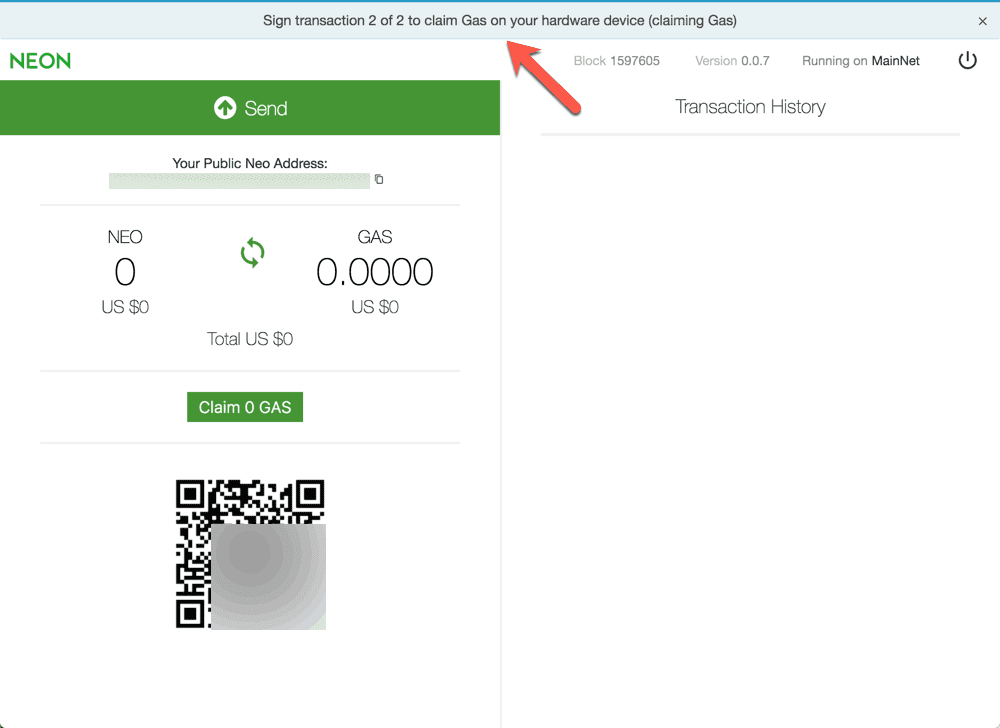
Even when you claim GAS or do any kind of transactions which require you to send NEO or GAS, you need to authorize it from Ledger Nano S. This feature makes keeping your NEO and GAS secure.
From now on whenever you need to access your NEO or Gas, you just need to open the NEON wallet and log in using Ledger. Being a long time user of Ledger and holding some NEO, I heartily welcome this move.
It's so good to see Ledger team adding support for many new cryptocurrencies and thus making it easier for us to securely HODL coins for the longer term.






![Here Is A List Of The Best Cryptocurrency Trading Sites For Beginners [Updated List]](https://lh3.googleusercontent.com/blogger_img_proxy/AEn0k_tq3AC3IOw5IUbIGvYrSi4vTTC9QrqEXkzl6kbNCVWcMYSd175dd3SuccBoryI2QSO1Xfbmj_W7b3aJqCJJXo4TT17Cy4L09GeNfJa7bSYFveI)

No comments:
Post a Comment